Four Eyes Check & Entitlements
Let us look at the Four Eyes and Entitlement aspect of Step 2 of Project Creation in some more detail here.
There are three types of roles in the system for any Project:
-
Project Admin:
Project administrators can modify a project, including changing the quantity of data sets to include, changing project user entitlements, or re-running models. By default, the person creating the Project takes on the Project Admin role. -
Reviewer:
This role provides 1st level feedback to a Training Task. Assigning a Reviewer to a Resolve Project is mandatory, and you can have more than one Reviewer. -
Approver:
This role validates the feedback provided by the Reviewer. The System Administrator can set a parameter to determine whether independent Approvals (i.e.mandatory four-eye checks) are required.
A user can’t be assigned both Reviewer and Approver roles. The System will ensure that unique Reviewers and Approvers are assigned to individual tasks if the mandatory four-eye check option is enabled.
System Validations:
-
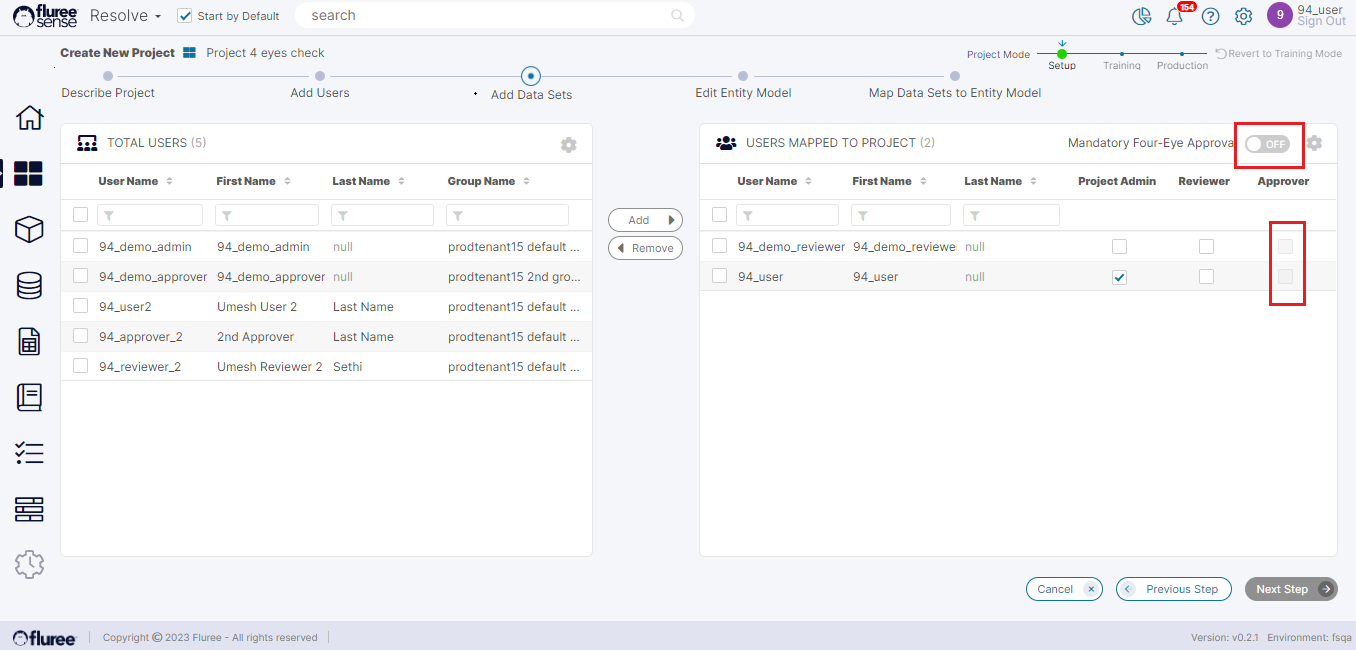
If the Four Eyes check is OFF (as shown in the image), the approver column is disabled.
-
If the four-eyes are ON, then at least one reviewer and one approver are required. When it’s OFF, at least one reviewer is required for "Next Step" to be enabled.
-
The user with an Admin role can't be an Approver or Reviewer for "Next Step" to get enabled.
-
Each Project needs at least one user as Project Admin. There must be another Admin assigned before the logged-on user can be removed as Admin from the Project.